City pages
City pages for WordPress, without the copy and paste
Townsmith Local Pages Engine turns one page design into a page for every city you serve. Each is an ordinary WordPress page you can open and edit, it keeps working if the plugin is ever switched off, and it is checked for copy-and-paste sameness before it goes live.
Free on WordPress.org · Real, editable pages · Keeps your existing URLs
The trouble with most city pages
Most city pages are one page with the city name swapped. They are quick to make and easy to spot, by readers and by Google, whose spam policies describe that pattern directly. The answer is rarely fewer cities. It is giving each page something that is only true of that city, and using a tool that notices when you have not.
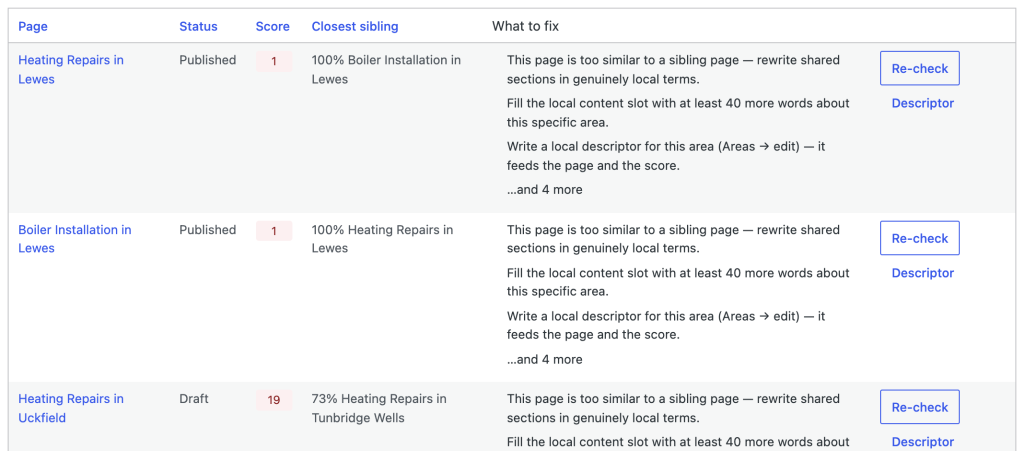
Pages that read too alike are named alongside the sibling they copy, with what to change. Here, Heating Repairs in Uckfield shares 73% of its text with the Tunbridge Wells page.
What a city page needs that a template cannot give it
Every generated page starts with a named, empty slot for the part only you can write. What goes in it is up to you, as long as it is true:
- A job you finished in that city, and what made it different.
- How long it takes you to get there, and which days you are usually nearby.
- The local detail that changes the work: conservation areas, the age of the housing, parking, access.
- The questions people in that city actually ask you.
The score weighs that slot heavily, so a page made of template text alone will struggle to clear the bar, and Twin Finder shows you the exact sentences a page still shares with its nearest sibling. If you are stuck for material, twenty things to write when every town looks the same is a good place to start.
Built like the rest of your site
- Real pages. Tokens are filled in when a page is generated, not on every visit, so each city page is a normal saved page you edit in the block editor like any other.
- Your design. The pages take your theme’s styling. On Elementor Pro, one Theme Builder template with the Townsmith location pages condition styles every city page at once.
- Your URLs.
/plumber-leeds/, nested under a hub page, area first, or a pattern of your own under one parent, such as/locations/leeds-plumber/. See URL structure for all four. - Safe to switch off. The content, and the links between the city pages, are saved into each page, so nothing breaks or disappears if you remove the plugin.
Moving from another plugin
If your city pages already rank, their addresses are worth keeping. The custom URL pattern lets you choose the parent page and write the slug as a template, so {area}-{service} under a Locations page gives /locations/leeds-boiler-repair/. Match the old slugs and, once the old pages are retired, the new ones take over the same addresses with nothing to redirect. Pages you made by hand are left alone; the plugin only manages the pages it generated.
Change the design once, update every city
Edit the blueprint and a review screen shows exactly what would change on each city page before anything is applied. Blocks you have edited by hand are yours: sync never overwrites them, and never puts back a block you deleted. On the free plugin you apply changes page by page; Pro adds bulk sync for the whole set in one go.
Large lists, ordinary hosting
Generation runs through a queue in small batches, so a long run does not trip your host’s time limits, and an interrupted run carries on where it stopped without making duplicates. There is a command line too, wp townsmith, for anyone who would rather script it. Pro adds bulk CSV import and export for moving a whole list of cities and services in one pass, and scheduled publishing for releasing finished pages a few at a time rather than all at once.
Free, and what Pro adds
Generation, the score, Twin Finder, the Safety Check, schema, internal links, all four URL patterns and per-page sync are free, with no cap on cities. Pro, from £49 a year, adds bulk sync and re-scoring, CSV import and export, scheduled publishing, an enforceable publish gate, slugs that redirect themselves when you change them, related cities ordered by real distance, per-branch contact details and a map on each page. The pricing page compares the two.
Common questions
How many city pages can it make?
The plugin sets no limit. The useful limit is how many cities you can say something true about, which is why each page is scored before it publishes. Start with the cities you already work in, and add more as each batch earns its keep.
Will city pages get my site penalised?
Not for being city pages. What Google acts against is a set of near-identical pages made only to rank, with a city name swapped and nothing else different. The score and the Safety Check exist to catch exactly that before you publish. They are guidance worked out on your own site, not a promise from Google.
Does it use AI to write the city pages?
No. Pages are assembled from your blueprint and your own copy, and the local slot stays empty until a person fills it. The free plugin has no AI at all. Pro has an optional assistant, off by default, that can reword a sentence you select; it never writes a page.
Will it clash with Yoast or Rank Math?
No. It detects Yoast SEO, Rank Math, All in One SEO and SEOPress, leaves titles and meta descriptions to them, and adds only the Service part of the schema, linked to the organisation they already describe. Setting up multiple locations in Rank Math? This guide covers how the two fit together.
Search for Townsmith under Plugins, Add New in your dashboard, or get it from WordPress.org. Covering towns from one base rather than separate cities? Service area pages walks through that setup.