Service area pages
Service area pages for WordPress, one for every town you cover
For the business with one base and a list of towns it travels to. Townsmith Local Pages Engine builds a real WordPress page for each service in each town, and checks every one against its siblings before it goes live.
Free on WordPress.org · No cap on services or areas · Pro from £49 a year
Why the website has to do this work
A Google Business Profile lets you list up to 20 service areas, but listing a town does not make you rank in it. Map results follow the address you verified at, your reviews, and how close you are to the person searching. For every town beyond your doorstep, the result that can win is a page on your own site about the work you do there. The guide to the Business Profile service area limit covers what the profile field does and does not do.
Those pages have to be worth reading. Twenty copies of one page with the town name swapped are exactly what Google’s spam policies warn against, and a set like that tends to sink together. So everything in the plugin is aimed at making each page different for a real reason, not just a different place name.
How the pages get built
- Tell it what you do and where. A setup wizard takes your business details, your services and the towns you cover. You can add more of either at any time.
- Design one page. A blueprint is an ordinary block-editor page with tokens such as
{{service}}and{{area}}, plus variation blocks that rotate the wording so neighbouring pages are not word-for-word copies. - Generate the set. The dashboard lays out every service against every area. Choose the combinations you want and each becomes a draft page, built in batches that pick up where they left off if anything interrupts them, so it runs on ordinary shared hosting.
- Write the local part. Every page starts with an empty slot for something true about that town: a job you finished there, how long it takes you to get there, the parking, the age of the houses. Nothing fills it in for you.
- Publish what clears the bar. Each page is scored out of 100 before it publishes, with a list of exactly what to fix. Nothing goes live on its own.
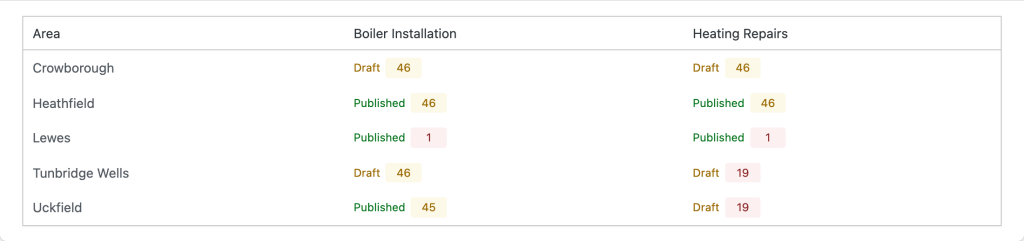
The services-by-areas dashboard: every combination, whether it is published yet, and its score.
What keeps twenty pages from reading as one
The score is three measured parts. Up to 45 points for being different from the closest sibling page, compared five words at a time. Up to 35 for local substance: the local slot filled, a description of the area, a map or a set of questions answered. Up to 20 for clearing a thin-content floor: enough real words, one clean main heading and a meta description. The default bar is 60, and you can move it.
Two checks sit on top of the score. The Safety Check reads every page at once and tells you how much of the set is ready and which pages look like near-duplicates. Twin Finder, inside the editor, highlights the exact sentences a page shares with its closest sibling, so you know what to rewrite instead of guessing. The quality score documentation sets out the maths.
What every page carries
- Schema that matches the page. LocalBusiness and Service markup naming the area served, plus breadcrumbs. If Yoast SEO, Rank Math, All in One SEO or SEOPress is running, the plugin steps back and adds only the Service piece, linked to the organisation they already describe.
- Links between the pages. Each service gets a hub page, and each area page links back to it and across to the other areas, so no page is left stranded. The links are written into the page itself and keep working if the plugin is switched off.
- The URL structure you want.
/boiler-repair-leeds/, nested under a service hub, area first, or your own pattern under one parent page. If you are moving from another plugin, the URL structure guide shows how to keep the addresses you already rank for. - Updates that respect your edits. Change the blueprint and you see what would change on each page before anything moves. Any block you have edited by hand is left exactly as it is.
Free, and what Pro adds
The free plugin does everything above, with no limit on services, areas or pages. Pro, from £49 a year, adds what you reach for once the set gets large: a publish gate that holds back pages under the bar instead of warning about them, bulk CSV import and export, scheduled drip publishing, bulk sync and re-scoring, related areas ordered by real distance, and coverage maps that shade how far you travel. Every Pro tier has the same features; you only choose how many sites. The pricing page has the full comparison.
Common questions
Do I need a street address on every page?
No. A service area business usually works from one base, and every page uses that one set of business details. The street address is optional, so you can leave it out if customers never come to you. Each page names its own town as the area served, in the text and in the schema. If some of your areas are real branches with their own phone number and address, Pro lets each of those carry its own.
How many towns should I start with?
The ones you already work in and can write something true about. For most trades that is five to ten, not fifty. Publish those, watch which pages earn impressions and enquiries, then add the next ring of towns. The guide to how many location pages to build works through it.
Will it work with my theme and my SEO plugin?
Yes. The pages are ordinary WordPress pages, so they take your theme’s design like any other page, and Elementor Pro sites can style them all through one Theme Builder template. Yoast SEO, Rank Math, All in One SEO and SEOPress are detected, and they keep handling titles and meta descriptions on these pages as they do everywhere else.
What happens to the pages if I stop using it?
Nothing. They are saved WordPress pages with their content and links written into them, so they stay exactly as they are when the plugin is deactivated.
Does it write the pages with AI?
No. The free plugin contains no AI and makes no outside calls; every page comes from your blueprint and your own words. Pro has an optional assistant, off by default, that can reword a sentence you pick. It never writes a page and never publishes anything.
To install it, search for Townsmith under Plugins, Add New in your dashboard, or get it from WordPress.org. Building pages for businesses with branches as well as travel areas? See location pages with maps.