Location pages with maps
Location pages with maps of your branches and the areas you cover
For a business with branches customers visit and areas it travels to. Each location page gets its own map, with pins for branches and a real outline or radius for the areas you cover, and each branch can carry its own phone number and address.
Part of Pro, from £49 a year · OpenStreetMap, no API key · Off until you switch it on
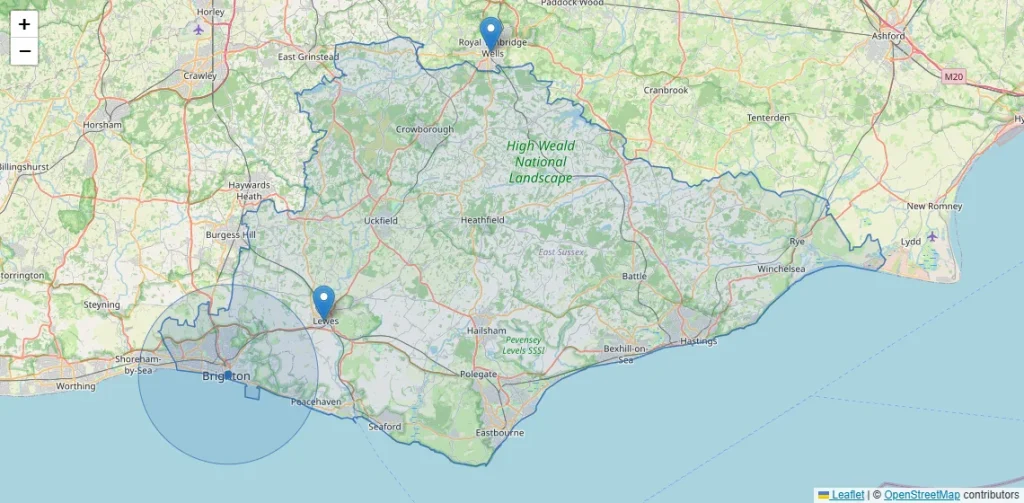
As the plugin draws it on a hub page: branches in Lewes and Tunbridge Wells as pins, a mobile service across East Sussex drawn from the county’s real outline, and a six-mile radius around Brighton. Map data © OpenStreetMap contributors.
Pins for places, shading for regions
There is no separate system for premises. Every area in the plugin already has a place for its coordinates, and what you add alongside them decides how it is drawn:
- Coordinates on their own draw a pin: somewhere customers come to you.
- Coordinates and a radius draw a shaded circle with a dot at its centre: somewhere you travel to, and how far.
- A looked-up outline draws the real boundary of a county or district you cover, instead of a circle that misses half of it or spills into the next one.
So two clinics and a mobile service across six counties sit on one map and read differently from each other, which is the point of showing them at all.
Coordinates and outlines without typing them in
Typing latitude and longitude is fine for three areas and tedious for fifty. Each area has a button that looks it up on OpenStreetMap by name and stores the coordinates, and the outline where one exists, on your own site. A button in Pro settings does the same for every area still missing them, ten at a time, at the one request a second OpenStreetMap asks for. It tells you which place it matched, because Alameda is both a city and a county, so you can correct it if it picked the wrong one.
Use the lookup for the regions you cover. For a branch, type its coordinates into the area’s details instead: an area with an outline is drawn as that outline rather than a pin. The lookup only runs when you click, sends the area’s name and nothing else, and the coordinates it finds also go into each page’s structured data.
Where the maps go
[townsmith_map]in your blueprint maps each page’s own area, so one line covers every location page.[townsmith_map scope="all"]on a hub page maps everything at once, branches and coverage together, like the map above.[townsmith_map area="123"]maps one particular area anywhere you want it.
Scroll-wheel zoom is off, so the map never traps someone scrolling past it, and the map files load only on pages that actually show a map.
Each branch with its own number and address
The free plugin keeps one set of business details for the whole site, which is right for a firm working from one base. A business with branches needs each branch’s page to show, and to tell search engines, that branch’s own details. Pro adds a contact box to every area for a phone number, an address and opening hours.
- Leave a field empty and that area uses your main details, which is right for a region you travel to.
- Fill in an address and the whole address is used, never mixed with head office’s, so a branch cannot end up with its own street and head office’s postcode.
{{phone}}in your blueprint shows each branch’s own number, and{{address}}and{{opening_hours}}are there too. When Local Pages Engine writes the page’s business schema, it uses the same details, so what visitors read and what search engines are told match. If Yoast SEO, Rank Math, All in One SEO or SEOPress is running, that plugin owns the business schema instead, so give each branch its own entry in that plugin’s location settings too.
Give an area its own details only if it is a real place with real staff. A different number or address for every town you merely travel to creates the inconsistency the guide to NAP on location pages warns about.
What it loads from outside
Maps are off until you switch them on. Once they are on, each visitor’s browser loads map tiles from OpenStreetMap, so their IP address reaches openstreetmap.org and your privacy policy should say so. The mapping library ships inside the plugin rather than loading from a CDN, there is no API key or account, and the tile source can be pointed at tiles you host or pay for. The free plugin still makes no outside requests at all. The coverage maps documentation has the details.
What it costs
Maps and per-branch details are part of Pro, from £49 a year for one site, with the same features on every tier. Pro runs on top of the free plugin, which builds the location pages themselves with no cap on services or areas, so you can start free and add maps when you want them. See pricing, or start with service area pages or city pages on the free plugin.
Common questions
Do I need a Google Maps API key?
No. The maps use OpenStreetMap tiles and a mapping library bundled with the plugin. There is no key to create, no account and no usage bill.
Can I draw my own territory?
Not by hand. A region is drawn from its real outline where OpenStreetMap has one, or as a radius you set. For an irregular patch, several areas with their own outlines or radii build up the shape between them.
Will a map slow my pages down?
Only pages that show a map load the map files, and the map draws from data already in the page rather than asking your server for more. The tiles load from OpenStreetMap as the visitor views the map, as with any web map.
Does the free plugin show maps?
No. The free plugin makes no outside requests, and map tiles are one, so maps are a Pro feature you choose to switch on. Everything else about the location pages, from generation to scoring and schema, is free.